What's In a Start Page?
About Start Pages
A "start page" is the web page you see whenever you open a new web browser window or tab, hence the alternative name "new tab".
Most people don't modify their start page, probably leaving them with something empty, perhaps with a few shortcuts, like you'll find in Chrome or any usable form of Firefox. Alternatively, they could find a mess of corporate news sites a la Microsoft's browser, or Firefox in the first ten seconds of install. I'm quite confident that the lack of clutter in Chrome's default is one of the reasons they're so popular. I can't blame people for seeing Microsoft's and Mozilla's initial offerings and escaping immediately. Some users will take their default start page and edit the colours or background image, or deliberately add shortcuts, and this is enough for them. As far as productivity goes, you can't go too wrong with a minimalist start page like that, but it's not enough for everyone.
The next level up in start page design is using a browser extension like 'Momentum' or 'Tabliss' to effortlessly generate a more aesthetically pleasing start page than the default. Users will probably customise their backgrounds and shortcuts, if they want any, and possibly add quotes, or use boring default quotes if they're available. I don't know why, but everyone seems to have a quote section on their start page, or anywhere really. If all of these options are too minimalist for you, or you just want to be special and have your own special shortcut links and icons tab, then you may be too far gone. It's time to create your own start page!
The obvious place to look for inspiration is r/startpages, because I couldn't find anywhere else. Most of the designs on here aren't really interesting because they tend to feature slick minimalist designs with big buttons, but I suppose they are *supposed* to be functional after all. Apart from those, I've seen terminal-themed start pages and even a start cube on there, as well as some really cluttered and interesting ones which probably work brilliantly for the creator. I've seen designs which look like they're for tablets, which got me thinking about making one with the theme of a video game console menu. The Wii or Wii U theme would probably work pretty well for this, although ultimately they are basically just 2D arrays of buttons.
My Own Start Page
After finding out I can change my start page a while ago, I immediately made my own, to feel special. I used a browser extension called new tab override to set my home page to a custom link, which I set as a localhost the start page is set to by a PHP script (php -S localhost:1234 in the start page's directory).
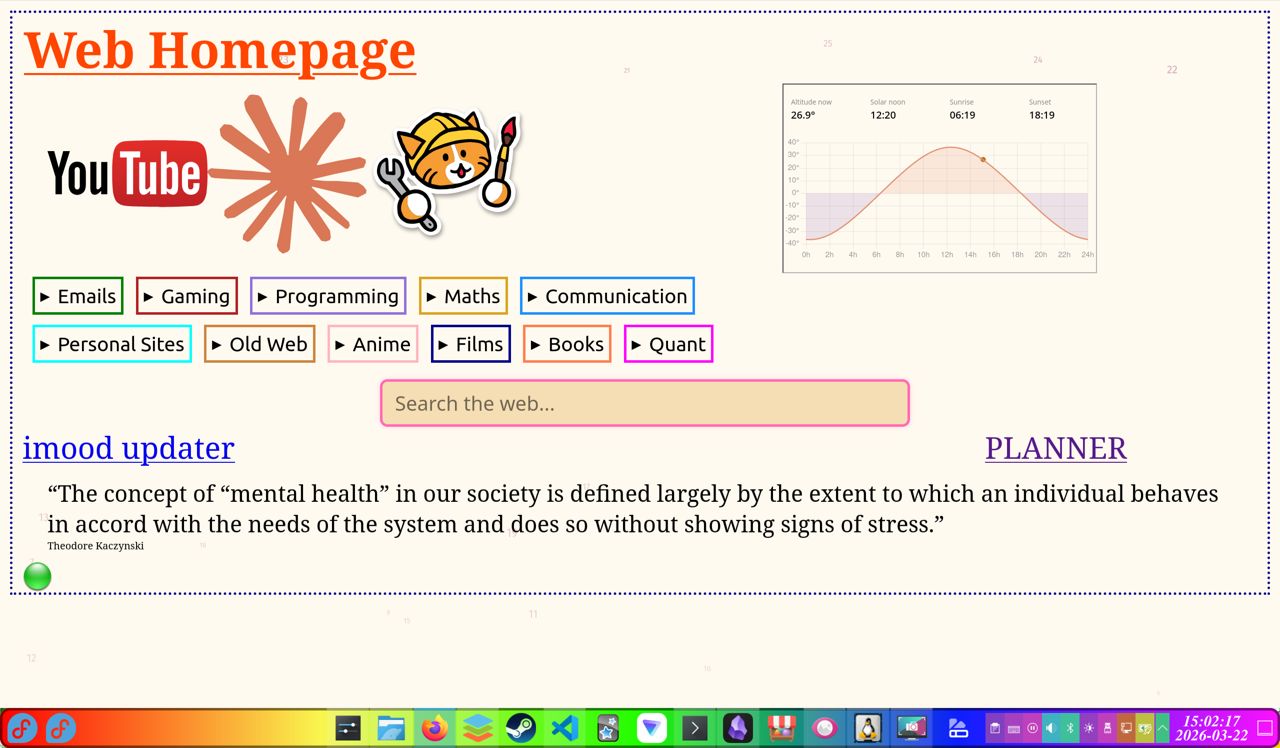
My own start page doesn't really try to be minimalist or technical, in fact, it doesn't really have any consistent theming at the moment, which is admittedly odd. It features big buttons for the two websites I visit the most, as well as the website I try to visit the most! Beneath those are all of my links, sorted by topic. Between them all, there are 103 links! I imagine the distribution of the links I visit follows the Pareto principle quite well, so it would probably make sense to prune some of the links, but as they're unobtrusive, I don't have much reason to. I have an obligatory search bar (duckduckgo), although honestly, I tend to use the address bar instead. I have a link to imood, to ensure I update it occasionally, and a quote section, whose quote bank I'm adding to over time.
I updated my start page recently. I added a graph showing the Sun's current position, which makes me think about how little time I have left in the day better than an ordinary clock. I also added a background animation of numbers randomly falling from the top of the page to the bottom, counting from 1 to infinity. There is minimal practical utility to either of these features, but they make my start page feel less lonely without making it feel cluttered either. Finally, I added a link to my "PLANNER", a new experimental website which I'm test driving as a daily routine builder, working from the list of tasks I mentioned in that recent blog post.
Here's the screenshot of my start page. As a bonus, that rainbow-gradient bottom of the screen panel I mentioned in a blog post has been included, as it fits in with the theme of customising random things that probably don't need to be customised!